
Program and service setup
Defining the services each customer receives, in what order and how far apart.
SPRAYE helps lawn care companies plan recurring work, build routes, assign technicians, manage changes and give field technicians the information they need to complete each service.
Keep scheduling, routing, technician workflows, property details, service information and treatment records connected from the office to the field.
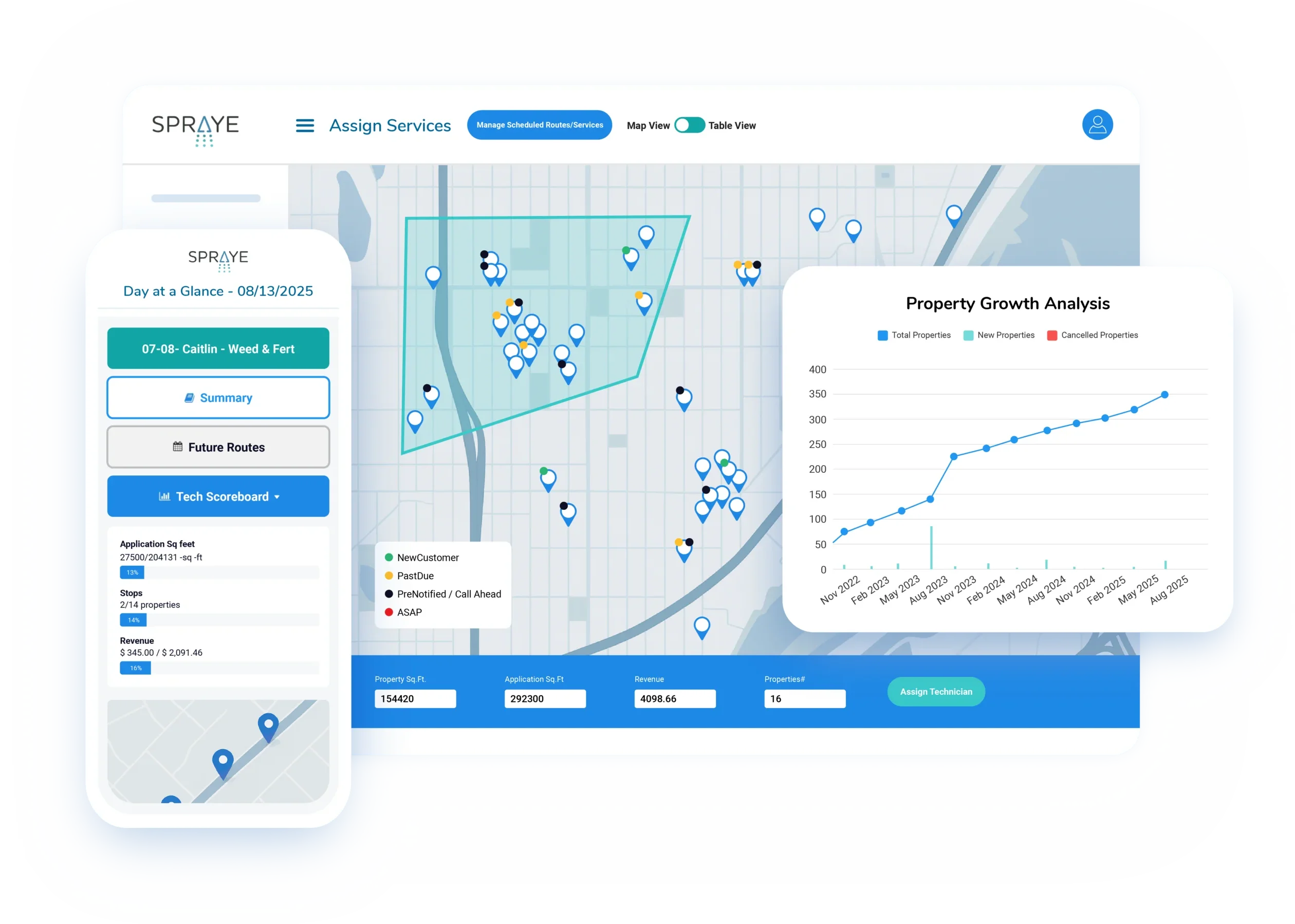
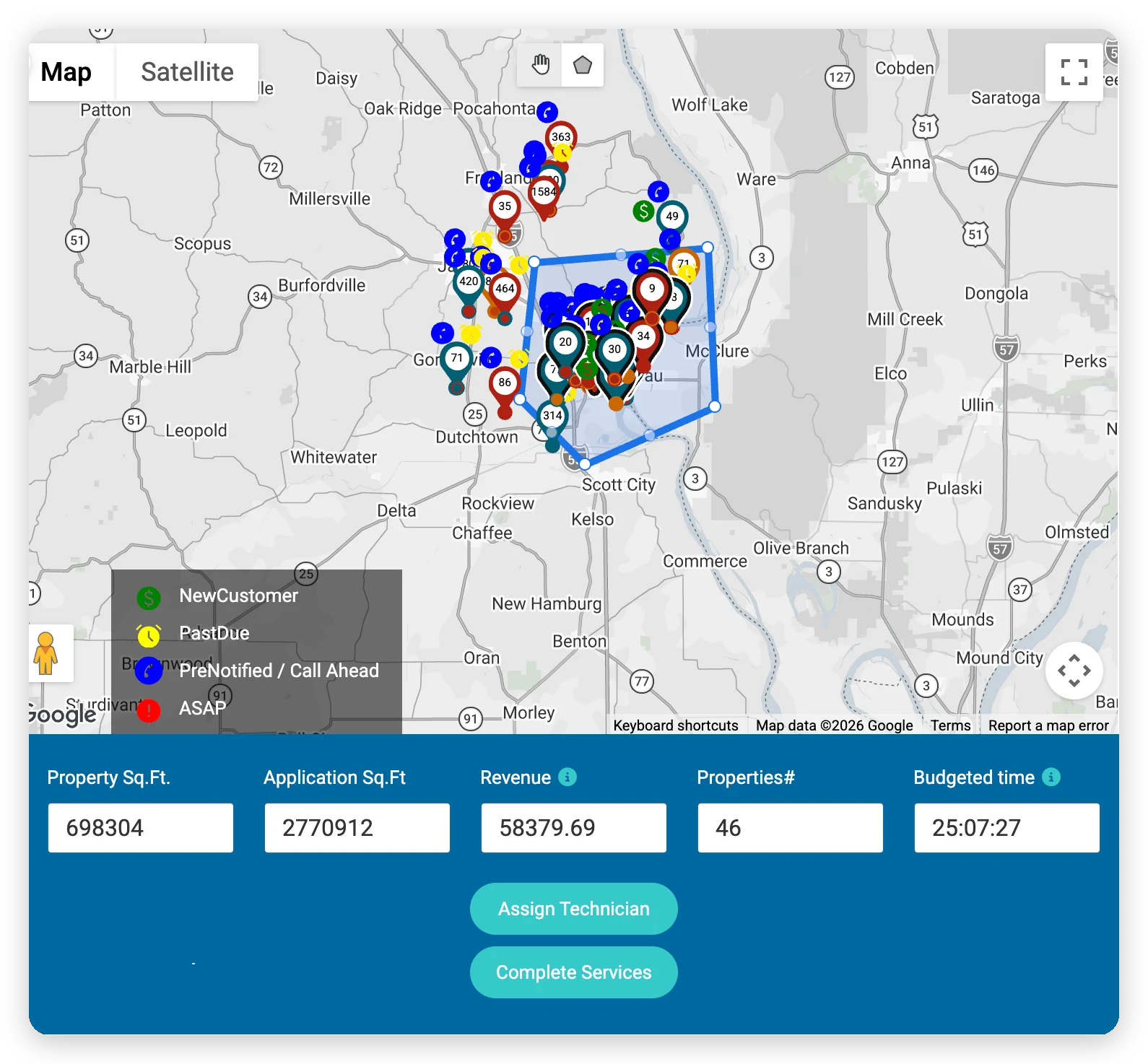
Service delivery covers everything between a sold program and a completed, recorded and billed service: planning each round, routing it, getting it done in the field and keeping customers and the office up to date.
For a treatment company, that happens hundreds or thousands of times a season, across every technician and service area you run.

Lawn care technicians run dense routes, often dozens of stops a day, and each round has to land within a window that depends on the season and the last visit. Weather can wipe out a day at a time, and every application needs a detailed chemical and service record.
The schedule, the route, the technician and the customer are tied together. When one of them changes, the others have to change with it.
Any company running recurring treatment rounds with more than a handful of customers benefits from connected scheduling and field tools.
From program setup to billing, here’s what has to happen for every round you deliver.
Defining the services each customer receives, in what order and how far apart.
Knowing which services are due, overdue or not yet ready for each property.
Grouping stops by area and ordering them to cut drive time.
Assigning routes to technicians and balancing work across the team.
Making sure each technician has their stops, notes and the products the route needs.
Giving technicians customer, property and service details at each stop.
Recording products, rates, weather and service details for each application.
Letting customers know when you’re coming and what was done.
Moving completed work into invoicing and tracking production automatically.
Scheduling problems compound. A slow morning in the office becomes a late start in the field, which becomes a missed service and a phone call.
Building tomorrow’s routes by hand eats into every morning.
A rain day means moving every stop and calling every customer, one at a time.
Notes, gate codes and service details don’t make it to the field, leading to callbacks.
The office has to call or text technicians every time something changes.
Completed work isn’t tied to the customer account, so service history is incomplete.
The office can’t see what’s done, what’s left or what needs to move without calling the field.
SPRAYE connects every program, property and customer to the schedule and the technician’s route, so changes made in the office show up in the field.
Some features, including text messaging, “on my way” texts, right-side routing and inventory, vary by plan. See pricing for details.
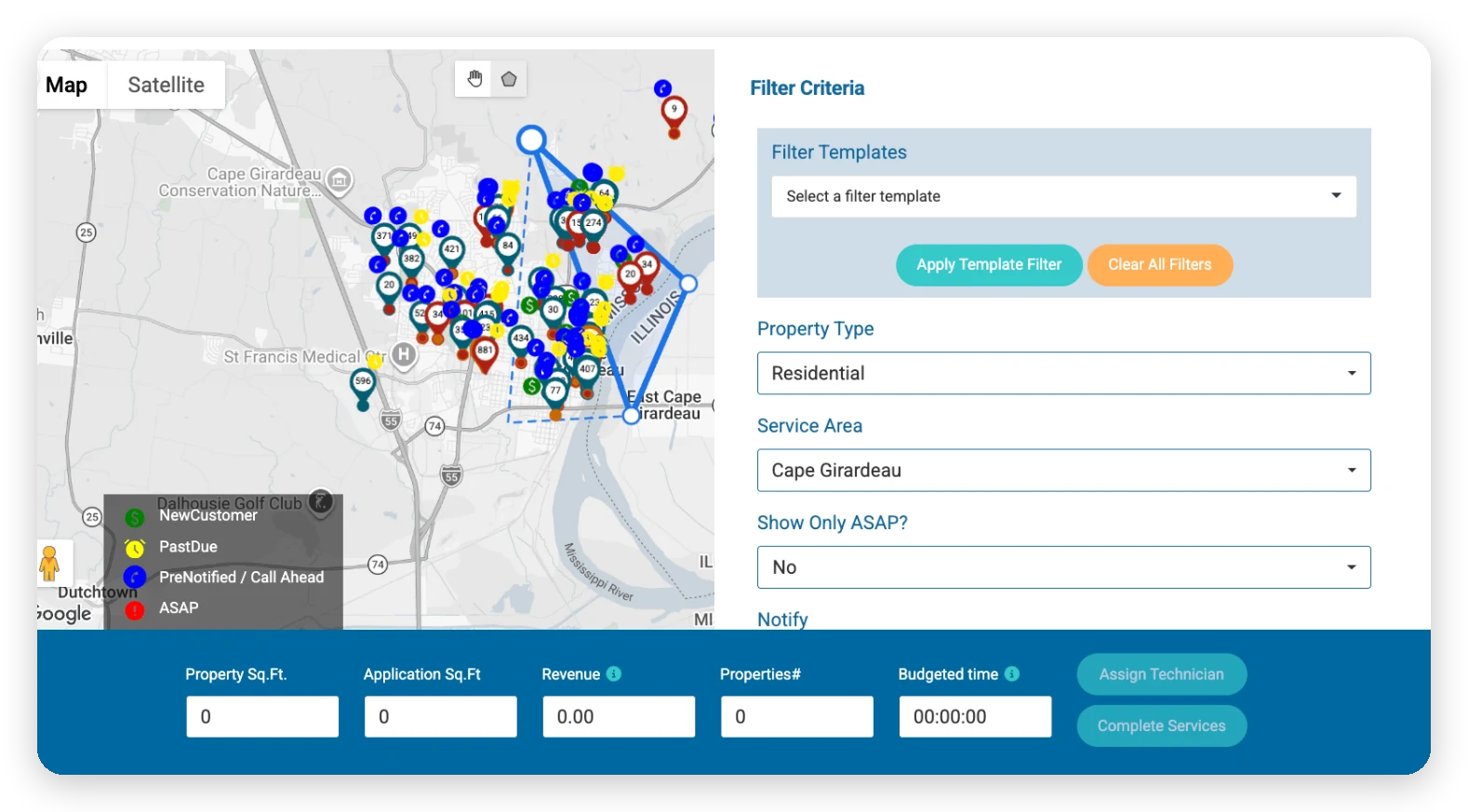
Every service in every program lands on your unscheduled services list, marked due, overdue or not due based on the program’s spacing and the last visit. Filter by service area, program, tag or promised date, select properties on the map and assign them to a technician and day.
Use “hold until” dates to keep a service off the schedule until it’s ready, and promised dates for customers who were given a specific day.
See the number of stops, total square footage and revenue as you build each route. SPRAYE orders the stops to minimize drive time, with an option to route by the right side of the road so technicians stay curbside.
Drag and drop to adjust a route by hand, and routes are recalculated as stops are added, moved or completed. Route optimization is included with every subscription.
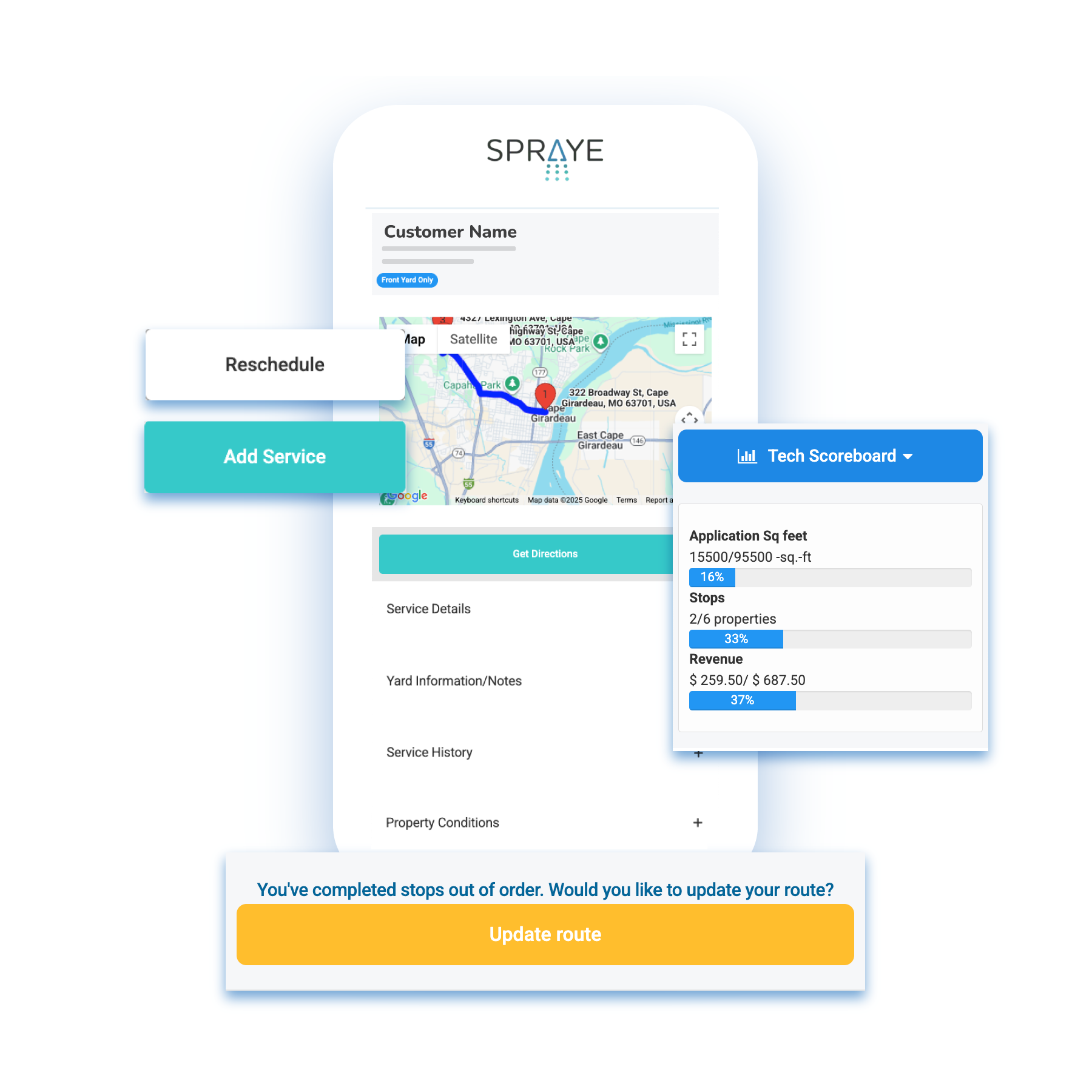
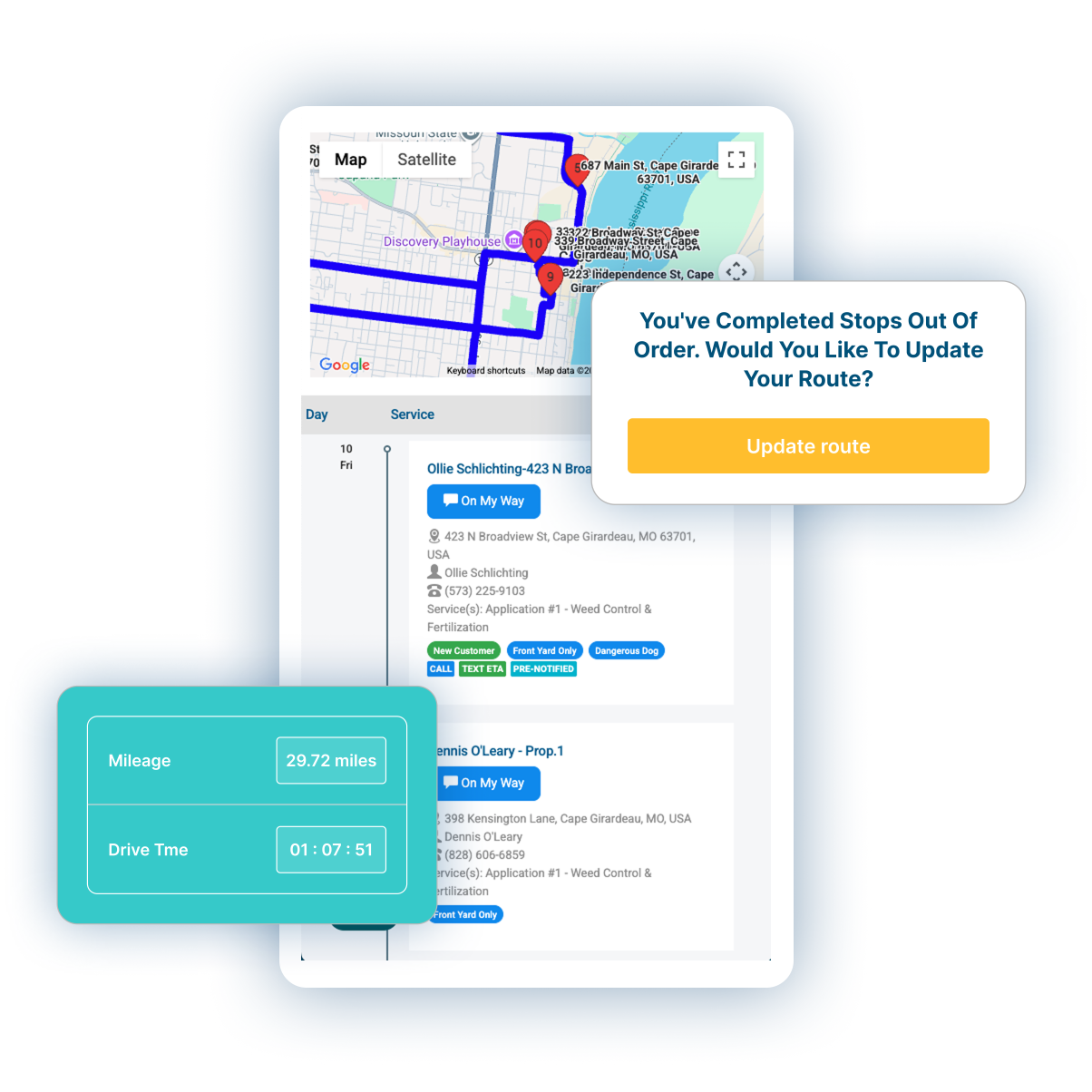
Technicians open their route on any phone or tablet, with no app to install. Each stop shows the customer and property, square footage, grass type, property notes and images, the program and service, product details, service history and, if you choose, service pricing.
One tap opens directions to the next property. Technicians can send an “on my way” text, add services, take payments and reschedule from the field.
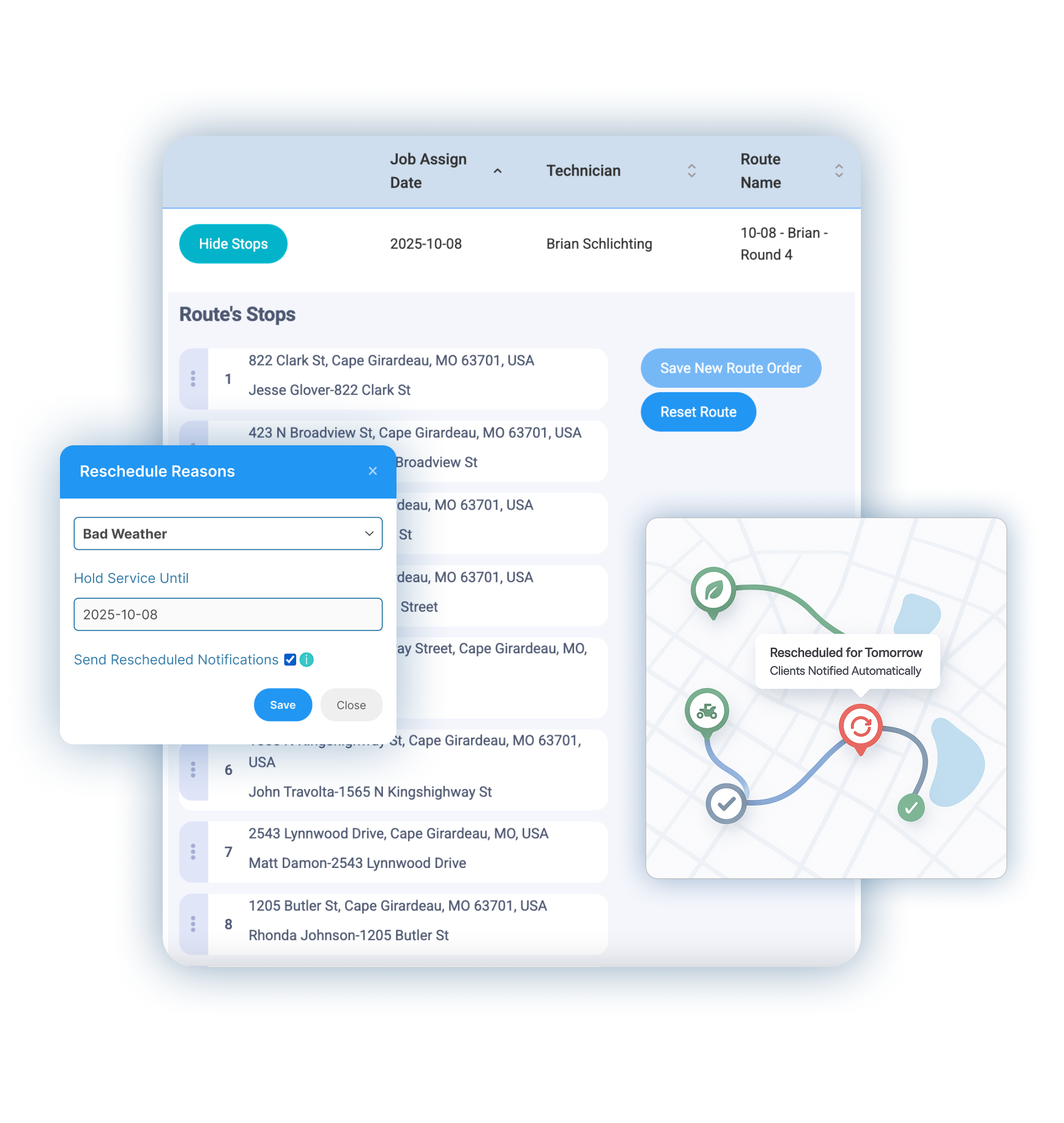
Move a stop to another day or technician by dragging it, or move an entire day’s work in bulk when weather gets in the way, and notify affected customers in a few clicks.
When a technician can’t complete a stop, they can reschedule it from the field with a reason, and it goes back on the list to be scheduled. The office can also skip a service with a reason, so you always know why work moved.
Each technician sees the day’s mileage, drive time, stops and square footage, plus the products they need to load before leaving the shop.
Technician dashboardProducts, rates, amounts, weather and times are recorded when the technician completes the service. With our inventory option, product inventory is deducted at the same time.
Chemical trackingService scheduled, pre-service reminder, reschedule and completion notifications go out by email, or by text on Essentials plans and above.
Customer communicationsPay-as-you-go services are invoiced at completion and customers on autopay are charged automatically. Prepay customers receive a work statement.
Invoices & billingSee scheduled and completed services on the dashboard, a technician scoreboard and revenue per hour by technician.
Draw service areas on the map and use them to filter, schedule and assign work across your territory.
A side-by-side view of each stage in delivering a lawn care service and how SPRAYE handles it.
| Stage | What needs to happen | How SPRAYE supports it | ||
|---|---|---|---|---|
| Service setup | Define what work the customer receives | Programs with ordered services, spacing and a billing type | ||
| Scheduling | Decide when each recurring service should be completed | Unscheduled services marked due or overdue, with hold-until and promised dates | ||
| Route planning | Organize stops efficiently | Map-based scheduling with route optimization on every plan | ||
| Technician assignment | Assign work to field staff | Assign by technician and day, with drag-and-drop changes | ||
| Route preparation | Give technicians their stops and products | Technician route view, route summary and truck-loading summary | ||
| Field execution | Access property and service details | Mobile technician dashboard with property, service and product details | ||
| Treatment recording | Record products, rates, weather and service details | Application records captured at service completion | ||
| Service completion | Record completed work | Completion from the stop screen, with start and finish times recorded | ||
| Customer communication | Keep customers informed before and after service | Automated notifications by email, and by text on Essentials and above | ||
| Office visibility | Track services and production | Dashboard, technician scoreboard and production reports | ||
| Billing | Move completed work into invoicing and payment | Pay-as-you-go invoices finalized at completion, with autopay for enrolled customers; work statements for prepay |
Service delivery shouldn’t sit in a scheduling tool that doesn’t know about the rest of the customer relationship.
Lawn care companies using SPRAYE spend less time in the office and more time producing.
Weekly admin at C4 Spraying, down from 16–20 hours
Active properties at South Georgia Turf Management, up from 175
Customer growth at Hippo Turf Care, from 305 to 1,060 customers
Learn why SPRAYE is trusted by hundreds of lawn care operators across the country.
This will keep you on the lawns making the big bucks instead of worrying about everything being scheduled, tracked, and documented on paper. Wish I would have had this back in the day. Doing business would have been much easier.
I’m still pretty new to the SPRAYE software. Setting it up and getting products, services and programs built does take some time but they help you get it all setup, all you have to do is get them your customer info. Makes my life way easier for sure!
Once it's all done everything goes pretty smooth, especially when you're in the field working. It does pretty much everything else for you automatically from how you have your programs built. Hopefully that helps you.
Recurring treatment work touches every part of the business. These pages show how the pieces connect.
Build, sell, bill and renew multi-round treatment programs.
Read moreCapture products, rates and weather with every service, and keep records ready to review.
Read moreKeep customers moving from estimate to service, payment and renewal.
Read moreRoutes, property details, products and completion on any phone or tablet.
Read moreYes. Each program is an ordered list of services with the days between them. SPRAYE marks each property’s next service as due, overdue or not due, and your office schedules them onto technician routes from a map or list.
Yes. Select stops on the map, assign them to a technician and day, and SPRAYE orders them to minimize drive time. Route optimization is included with every subscription.
Yes. Drag stops to reorder them or move them to another day or technician, or reschedule an entire day in bulk. Routes are recalculated as stops change.
Yes. Technicians open their route on any phone or tablet in a mobile-friendly web app, with one-tap directions to each property.
Technicians see customer and property details, square footage, grass type, notes and property images, the program and service, product details and service history for each stop.
Yes. The office can move or skip services, with a reason recorded for each skip, and technicians can reschedule a stop from the field. Rescheduled services go back on the list to be scheduled.
Yes. Technicians complete services from their dashboard, and SPRAYE records the products, rates, amounts, weather and times as part of the completed service.
Yes. You can schedule and route work across all of your technicians, adding users as your plan allows, and draw service areas on the map to organize and filter work across your territory.
Yes. SPRAYE can notify customers when service is scheduled, remind them before the visit, let them know about reschedules and send a completion notice afterward, by email, and by text on Essentials plans and above. Technicians can also send an “on my way” text where your plan includes it.
Yes. Pay-as-you-go services are invoiced when they’re completed, and customers on autopay are charged automatically. Prepaid customers receive a work statement for each completed service.
Yes. The dashboard shows scheduled, completed and to-be-rescheduled services, along with a technician scoreboard, and production reports show output and revenue per hour by technician.
Book a free, one-on-one demo and see how SPRAYE handles scheduling, routing and technician workflows for a business like yours.